
Whether you personally use Google Maps, Waze, or Apple Maps, claiming your business on all apps can be crucial to the success of your business. People have options when it comes to their GPS, and you want to be prepared either way. Claiming your business on Apple Maps can drive local traffic to your door, as well as allow all traffic to find you! Ultimately, it is quick, easy, and free, and can help improve your business’s SEO. In this guide, we’ll walk you through how to claim your business on Apple Maps so customers can easily find you.
How to Claim Your Business on Apple Maps: Step-by-Step
Claiming your business on Apple Maps is a quick and straightforward process, but each step is important for ensuring your information is accurate and fully verified. Below is a simple guide to walk you through everything you need to do, from accessing Apple Business Register to confirming ownership and optimizing your listing.
Step 1: Visit Apple Business Register
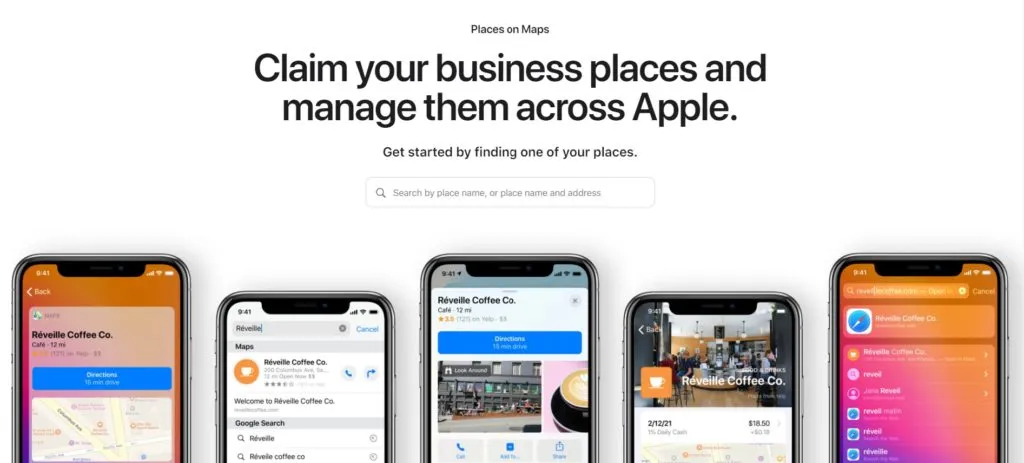
Type https://register.apple.com/placesonmaps/ in your URL. You will be directed to a Business Registration page that will allow you to sign in. Once you sign in with your Apple ID, you will select Add on Places on Maps.

Step 2: Search for Your Business
Type the name of your business or the address in the search bar, and select Claim. Apple will then provide you with details to review, or you will have to type in information regarding your business hours, your phone number, your email address, your address, and the categories that apply to your offering.
Step 3: Verify Your Ownership
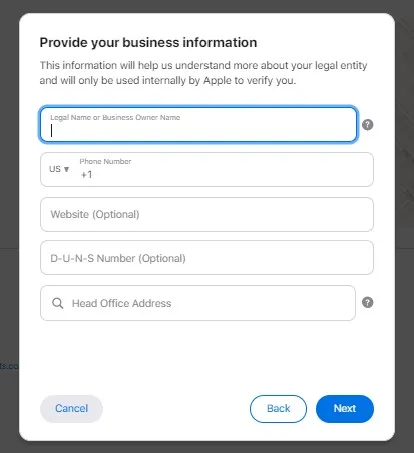
You will fill out personal information to verify your ownership of the business. This includes your name, your phone number, location, and business identification number.
Step 4: Submit Proof of Ownership
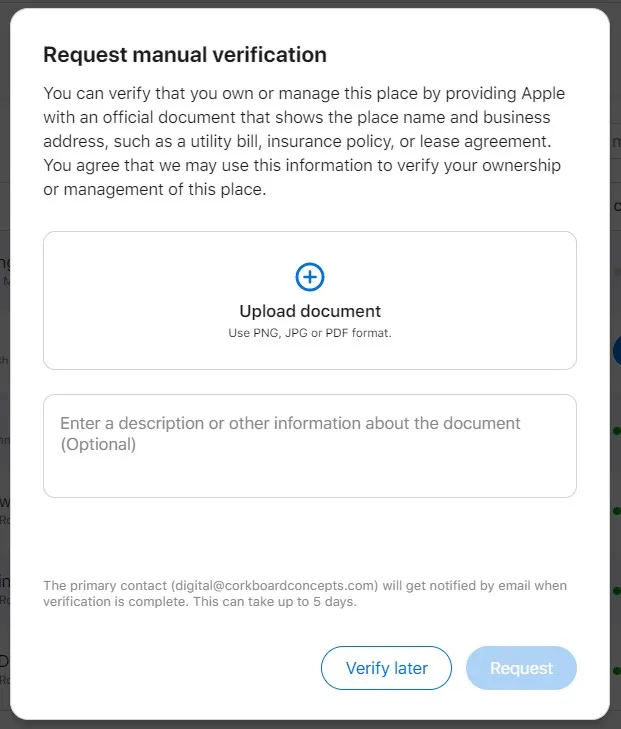
You will need to show proof of ownership. Whether that be receiving a phone call with a code, or submitting legal documents such as a lease agreement, an electrical bill, or an insurance policy.
Step 5: Finalize and Optimize Your Apple Maps Listing
Once Apple approves your ownership, you will just want to double-check your business hours and update if you are currently accepting Apple Pay. You can also add your website along with your social media accounts. Congrats! You have officially claimed your business on Apple Maps! Looking to claim your business on Google as well? We’ve got you covered! Click here to claim your business on Google!
Why It’s Important to Claim Your Business On Apple Maps
Claiming your business on Apple Maps is a simple step that can make a major impact on your local visibility. With millions of iPhone users relying on Apple Maps as their default navigation app, ensuring your business appears accurately can directly influence foot traffic, calls, and online engagement. When you officially claim your listing, you gain full control over your business information, including hours, contact details, categories, and location, so customers always see the most up-to-date details.
A verified Apple Maps listing also supports your overall local SEO strategy. Search engines value accurate, consistent business information across all platforms, and Apple Maps contributes to that credibility. When your listing is claimed, you’re more likely to appear in local search results, showcase your amenities (like Apple Pay), and provide a smoother user experience for potential customers.
Ultimately, claiming your business ensures you show up exactly where customers are searching, and gives your brand a competitive edge in your local market.
To Conclude
At Corkboard Concepts, we specialize in digital marketing strategies designed to elevate your brand’s visibility and drive growth. Whether you need assistance with claiming your business on multiple platforms, optimizing your online presence, or implementing effective marketing campaigns, our team is here to help. Don’t hesitate to reach out to us for personalized guidance and support. Contact Corkboard Concepts today to take your business to new heights!